Sorting the registered MIDI devices
If there are more than 10 devices registered in Windows, the KORG Bluetooth MIDI device may not work properly.
Sort the MIDI devices using the steps below, so that the KORG Bluetooth MIDI device (KORG BLE-MIDI device) is registered within the midi0–midi9 range (meaning the tenth device or less).
1Turn off the KORG Bluetooth MIDI device that’s in use.
2From the Start menu > KORG, select “Uninstall KORG USB-MIDI device ”.
Launch the KORG MIDI Driver Uninstall Utility.
3Click the [Next >] button. This shows a list of the MIDI devices registered on the computer.
Check whether the KORG BLE-MIDI Device is registered as one of the first ten devices (midi0–midi9).
Note: The MIDI devices shown depend on the computer’s OS environment.
Note: In Windows, a driver is set separately for each USB port, even if the MIDI device connected to those ports is the same. For this reason, when you connect a device to different USB ports, the same MIDI device will be registered multiple times.
4The KORG BLE-MIDI Device will operate correctly if it is registered as one of the first ten devices (midi0–midi9; see the illustration below).
You don’t need to sort the registered MIDI devices, so you can quit the KORG MIDI Driver Uninstall Utility.
5The KORG BLE-MIDI Device may not operate correctly if it isn’t registered as one of the first ten devices (midi0–midi9). Proceed to step 6.
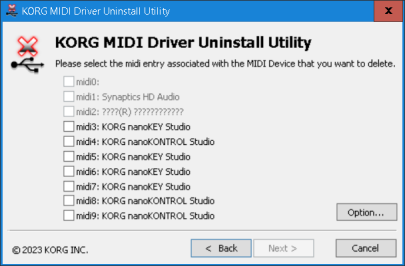
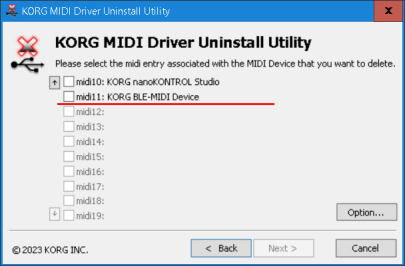
6Select the KORG BLE-MIDI Device and the check boxes of the first ten registered devices (midi0–midi9) that you aren’t using, and delete them.
Once you’ve deleted these items, click “Finish” and quit the KORG MIDI Driver Uninstall Utility.
7Uninstall the KORG BLE-MIDI Driver.
→ Uninstalling the KORG BLE-MIDI Driver
8Reinstall the KORG BLE-MIDI Driver.
→ Installing the KORG BLE-MIDI Driver
9Go back again to step 2, launch the KORG MIDI Driver Uninstall Utility, and check whether the KORG BLE-MIDI Device has been registered as one of the first ten devices (midi0.midi9).
* The devices may have been moved and the device slots may automatically be filled if you registered another device to the midi10 slots or higher. If this happens, repeats steps 5.7 until the KORG BLE-MIDI Device is registered in midi0.9.
10Restart your computer if necessary.
11Turn on the KORG Bluetooth MIDI device that you are using.