

|
|
Support
12/01/2011 - System Version 2.0PC/MAC:Operating System:Monotribe_V2_Update.zip System Version 2.0 This "zipped" download contains the most current Version Operating System update for the monotribe. OS Version 2.0 adds a new 16 step synth sequencer, part independent active step, drum roll, sample and hold, plus other useful shortcuts for improved real-time sequence editing.
A full description of the update is included in this download, along with instructions on how to install the OS.
We recommend the use of the most current software to all users.
10-26-11 – MIDI Implementationall:Korg_Apps_MIDI_Implementation.zip MIDI Implementation This is the MIDI Implementation for Korg’s iMS20 app, iElectribe, iElectribe Gorillaz Edition, and SyncKontrol. 5-19-2011 - monotribe Owner's Manual all:monotribe_OM_EFGS2.pdf Owner's Manual for the Korg monotribe This is the original Owner's Manual for the KORG monotribe in .PDF form.
Analogue Ribbon Station Congratulations to our Grand Prize winners. Click here to see the announcement video!
System Version 2
Announcing a major update for the monotribe! Version 2 provides many new features to take your playing to a new dimension!
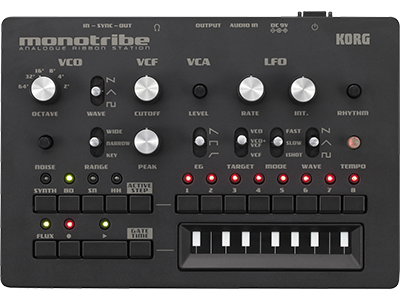
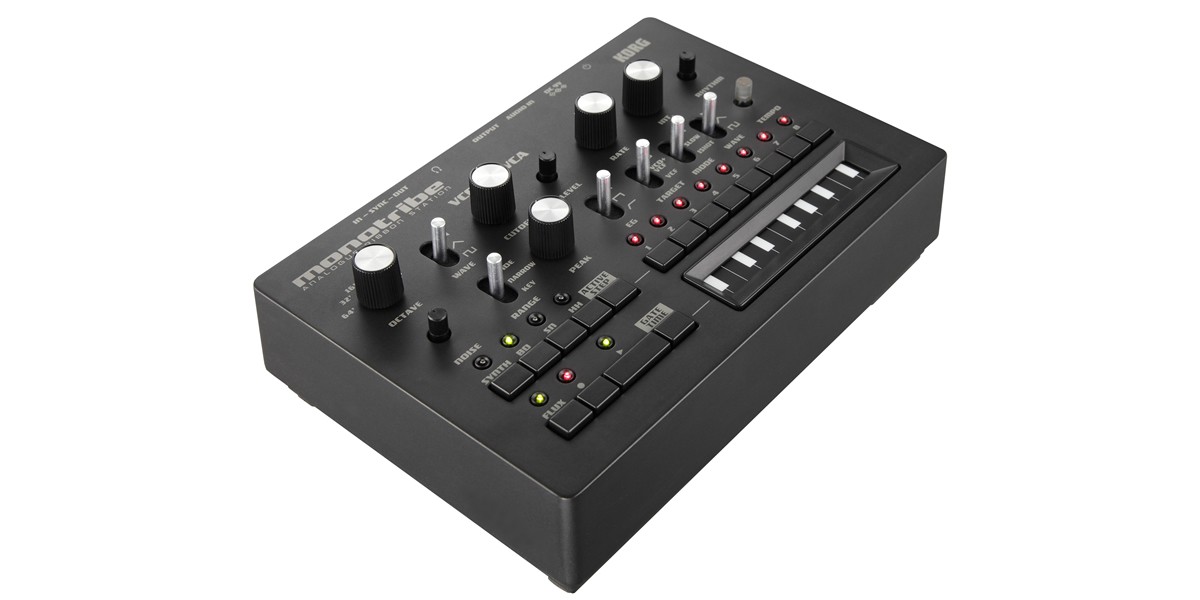
Announcing a major update to the monotribe analog ribbon station --- the full-fledged analog synth and rhythm unit with a step sequencer inherited from the Electribe! The monotribe Version 2 adds a plethora of new features, allowing you to create sequences that are even more elaborate, or to layer complex musical developments for extended performances.
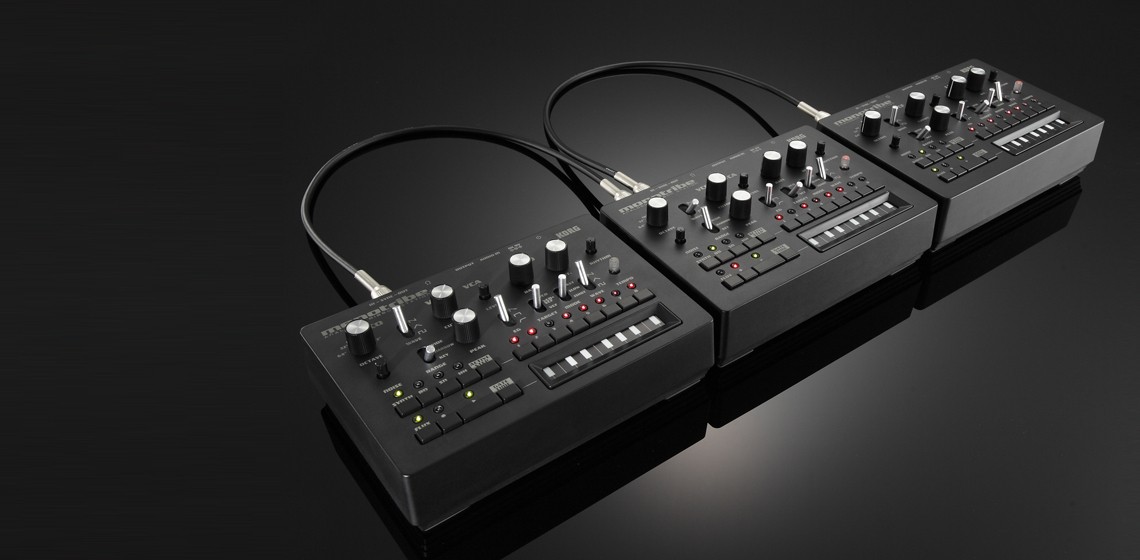
Surely one of the most exciting additions is a new synchronized performance mode that allows for new type of performance using multiple monotribe units. Whether you've never touched a monotribe or whether you're an expert who is thoroughly familiar with all of the current features, this new update guarantees that your analog groove-making will be more intense than ever before!
Highlights Sequencer:
- Synth part resolution has been doubled to 16 Steps
- Volume Automation has been added to the synth part.
- Active Step can be specified for each part.
- Drum Roll capability has been added.
- Gate Time Hold function has been added.
Synthesizer:
- Sample and Hold (S&H) function added to LFO.
Sync:
- Connected sequences allow multiple monotribe units to play in rotation.
- Half Tempo function has been added.
Short Cut Keys:
- Four convenient shortcuts for creating patterns quickly
16-Step Synth parts As with drum parts, the synth part now provides timing information in between the steps in a sequence, allowing a pattern to achieve a total of 16 steps.
Synth Part Volume Automation Volume Automation allows the synth volume to be recorded during playback to create more detailed sequences. The left side of the ribbon controller keyboard decreases the volume, and the right side increases it. This Volume Automation can even be controlled when if Flux mode is on.
Set individual Active Steps for each Part. The Active Step function lets you specify which steps are played or jumped when playing back the step sequencer. Now, the Active Step can be set individually for each of the SYNTH, BD, SD, and HH parts. By specifying a different number of steps for each part, you can create complex polyrhythms.
Sample & Hold (S & H) added to the LFO The newly added S&H function is indispensible for creating mysterious analog synth sound effects. The RATE knob adjusts the frequency of change, and the INT. knob adjusts the depth of change.
"What is Sample & Hold?" Unlike traditional LFO waveshapes that provide a constantly changing signal, the Sample & Hold feature takes a "sample" of the LFO signal and holds that level for a specific duration of time. The results are the highly popular and slightly random stepped-filter effects so famously used in analog synthesizers. By using noise as the input signal, the monotribe version 2 lets you create effects that change in a distinctively random manner. Drum Roll capability A roll can now be added to the desired drum part. The speed of the roll can be controlled using the ribbon controller keyboard; moving toward the right will increase the number of strikes. You can also record the drum roll using the sequencer to intuitively create subtle and dynamic drum patterns.
Linked Sequences play multiple monotribes in rotation The Link Sequence feature is a completely new sync method that vastly expands the scope of the monotribe, to deliver even more fun. When sequence playback reaches step 8, the sequence will automatically stop and the next monotribe unit will start playing. By loop-connecting the SYNC jacks, the playback can keep cycling through multiple units – in true modular fashion!
New Additions The Gate Time Hold function lets you use the ribbon controller keyboard to play and record new pitch information while retaining the gate times recorded in the sequencer. Also new is the Half Tempo function, which cuts the tempo in half when synchronizing to an external input from the SYNC IN jack. In addition, there are now four shortcut keys that instantly initialize various types of sequence data or active step settings.
Updating Procedure Thinking of monotribe as an analog synthesizer, the procedure of for updating the Operating System is also a very old-school, analog-style method, reminiscent of loading data via the playback of analog cassette tape. Simply download the system data which Korg has encoded as an audio (WAV) file from www.korg.com or from the website of your local Korg distributor. Then, play back the file using a WAV file player like a Smartphone or using PC application software, directly in to the monotribe's SYNC IN jack. When the audio (WAV) file finished playing, your monotribe has been updated. It’s a traditional procedure revived for a new generation!
WARNING! Do not playback the system update file on any speaker or headphone system as this could lead to damage to equipment and/or hearing loss. Neither Korg nor any of its affiliates will accept responsibility for any damages, personal loss or injury that may result from playback of the file.
True Analog Synthesis The monotribe’s sound engine uses technology old and new, merging the powerful sound of analog synthesis with the dexterity and playability required in today’s groove making environments. Analog technology is essential for fast and responsive control, and delivers the full sonic spectrum from warm and easy-going to full-throttle rampage.
Three-Part Analog Drums The monotribe provides a three-part rhythm section powered by discrete analog circuitry; bass drum, snare, and hi-hat. These three sounds were the key elements in a generation of analog beat making, and are still in demand today. Use these powerful drum sounds to generate distinctive beats attainable only from the monotribe.
Electribe-Style Groove Creation For over a decade, Korg's Electribe Series has served as the standard tools for dance music and DJ work, and has earned outstanding popularity, even appearing recently as top-selling iPad app. The fantastic step key interface lives on in monotribe, with a dedicated button for each of the eight steps. This allows realtime, hands-on step editing of not only the drum parts, but also for any synth part sequence played on the ribbon keyboard.
Active Step and Flux Mode Active Step editing lets you remove or re-insert individual steps, creating short loop-like effects or off-beat patterns that weave in and out of complex rhythms. The step buttons provide this Active Step control during playback, and also provide an instant return to the original 8-step sequence if needed. Flux Mode allows the creation of sequenced synth parts that are not rigidly tied to the step grid, providing more musical versatility. The creation and morphing of edgy beats and stuttering rhythms has never been easier.
Multi-Mode Ribbon Keyboard The ribbon controller keyboard provides three selectable playing modes/ranges. The chromatic mode (KEY) is ideal for playing melodies and bass lines, and stepping smoothly from note to note. Switch to the continuous mode (NARROW) for glides and bends - just as on the monotron. Also available is the wide continuous mode (WIDE) with a six-fold pitch range for dramatic synth zaps and screams. In addition, pressing the Gate Time button will allow the gate time to be sequenced as the ribbon controller keyboard is played.
Self-Tuning Analog Analog synthesizers of yesteryear were prone to drift in pitch. But no more! The monotribe’s self-tuning circuitry provides stable chromatic playability, and will not go out of tune. This self-tuning technology also means no warm-up time, no servicing for pitch calibration, no sensitivity to temperature changes – just the great sound of analog VCO.
Classic Analog Components – VCO, LFO, VCA The VCO offers a choice between sawtooth, triangle and square wave. White noise can mixed in to the oscillator signal in any amount. The Octave selector covers a broad range, from deep bass to piercing lead-lines. Three EG (Envelope Generator) presets provide the VCA with impressive versatility and dexterity. The LFO can be patched to the VCO and/or the VCF, creating impressive dynamic effects. The Range switch allows the LFO to deliver stirring cyclic changes over tens of seconds (SLOW) or superfast (FAST) audio-range FM ringing. Switching the LFO Mode to the 1-shot setting allows the LFO behave as a second envelope generator – a truly powerful addition!
Vintage MS-10/MS-20 Filter The monotribe features the same VCF circuit found on Korg's classic MS-10 and MS-20 analog semi-patchable synthesizers. Distinctively analog, this sharp and powerful filter adds dramatic change to the sound, imparting the uniquely memorable character of Korg’s early analog synthesizers. Using the audio input, any audio source can be enhanced by passing through the filter section. Process an instrument, a voice, or a complete mix form CD or MP3 and create larger than life filter effects!
Sync Jacks: A Return to Modular The monotribe provides both Sync In and Sync Out jacks, empowering multiple monotribe units to play and work together for a synchronized performance. Not just other monotribes, either. Audio line level pulses can trigger the Sync Input so the monotribe can be synchronized to a DAW system, for example. In addition, the polarity of the pulse waveform can be changed for both the input and output, so you can enjoy synchronized performance with a variety of equipment equipped with Sync connections.
On-The-Go Groove Making Light, compact, and portable, monotribe is great on the go. Equipped with a built-in speaker and powered by six AA batteries, it is completely self-contained and ready to deliver hours of enjoyment wherever you take it.
Specifications Keyboard: Ribbon controler keyboard
Sound Generator: Analog synthesis
VCO: Waveshape (Saw, Triangle, Square); Octave Range (64, 32, 16, 8, 4, 2); Noise Generator(Amount); Key Range (Wide, Narrow, Key)
VCF: 12 dB/Oct Low Pass Filter; Cutoff (Frequency); Peak (Resonance)
VCA: Gain knob: EG Select (Decay, Gate, Attack)
LFO: Rate (Speed); Intensity (Depth); Target Switch (VCO, VCF, VCO+VCF); Mode Switch (Fast, Slow, 1-Shot); Shape (Saw, Triangle, Square, Sample&Hold)
Drums: 3 parts, discrete analog, drum roll
Sequencer: 16 steps Volume Automation capability added to the synth part Active Step can be set for each part Link Sequence function
CONNECTORS: Audio In: 3.5mm / 1/8" stereo mini-phone jack Output: 6.3mm /1/4" stereo phone jack (unbalanced)
Headphones: 3.5mm / 1/8" stereo mini-phone jack
Sync In Jack: 3.5mm / 1/8" stereo mini-phone jack
Maximum input level: 20V
Sync Out Jack: 3.5mm / 1/8" stereo mini-phone jack
Output level: 5V
Power Supply: AA/LR6 alkaline battery (x6) AA nickel-metal hydride battery (x6) Optional AC adapter (DC: 9V)
Battery Life: Approximately 14 hours (when using alkaline batteries)
Dimensions (W x D x H): 207 x 145 x 70mm/8.15 x 5.71 x 2.76 inches
Weight: 735g / 1.62 lbs. (without batteries)
Included items: AA alkaline batteries for verifying operation; Owner’s Manual
* Specifications and appearance are subject to change without notice for improvement.
|